A GPU node costs more per hour than a rack of CPU machines, and the question finance asks about it is the same question they ask about everything: who used this, and how much? For CPU, memory, and disk you can answer that — cgroups account it per process, cAdvisor reports it per pod, Prometheus rolls it up per team. For the GPU, the honest answer in most clusters is that nobody knows. You are paying for the most expensive resource in the fleet and you cannot attribute a dollar of it.
This is not a tooling gap you forgot to fill. It is structural: the GPU is outside the accounting plane the rest of your stack relies on. This piece is about why, and about using eBPF to get attribution back — along with a hard line about what eBPF can and cannot see, because the most expensive mistake here is believing one tool answers a question it physically cannot.
Why is the GPU invisible to your existing metrics?
Three separate blindnesses stack up.
cgroups don’t account the GPU. A cgroup is a kernel construct that accounts and limits CPU, memory, block I/O, and PIDs. The GPU is none of those. Compute and framebuffer (VRAM) are managed by the NVIDIA kernel driver and the userspace CUDA runtime, and are opaque to cgroup accounting. There is a device cgroup controller, but it only gates access to the device nodes (/dev/nvidia0 and friends) — allow or deny. It does not account a single second of GPU time or a megabyte of VRAM. So the entire cAdvisor → Prometheus pipeline that gives you per-pod CPU and memory has, by construction, nothing to say about the GPU.
nvidia.com/gpu is an allocation count, not a utilization signal. Kubernetes learns about GPUs through the NVIDIA device plugin, which registers them to the kubelet as the extended resource nvidia.com/gpu. Pods request it as an integer — whole GPUs. The scheduler matches requested count to available count. That is the only thing the allocation layer knows. Requesting a GPU is not using a GPU. A pod can hold a whole device — and be billed for the whole device — while driving it at 3%. The allocation number you could charge back against is precisely the number that tells you nothing about consumption.
Even nvidia-smi’s utilization number lies to you. Reach for nvidia-smi and the utilization.gpu field looks like salvation. It is not what you think. NVML defines it as the percent of time over the sample period during which one or more kernels was executing. It measures temporal presence — was the GPU busy at all — not how much of it was busy. A single-thread kernel occupying one SM out of dozens can report close to 100%. Microsoft has reported under 10% compute utilization during the memory-bound decode phase of serving an 8B-parameter model on A100s — while a naive reading of “utilization” would call those GPUs full. If you charge back on utilization.gpu, you are billing on a number that says “busy” when the silicon is nearly idle.
So: the allocation layer knows count-not-use, cgroups know nothing, and the one easy percentage is measuring the wrong thing. That is the gap.
Two questions, and why they need different tools
Before any tooling, separate the two questions, because conflating them is the core error — the same shape as confusing the problem a tool solves with the problem at hand.
- Attribution — who did GPU work, and how much? This is the FinOps question. It needs per-pod, per-team accounting of GPU activity: which workload launched kernels, allocated VRAM, moved data, and for how long. This is what chargeback runs on.
- Efficiency — how well was the silicon used? Were the SMs actually occupied, were the tensor cores active, was memory bandwidth the bottleneck? This is the performance question. It tells you whether a team’s spend was justified, but it cannot tell you whose spend it was.
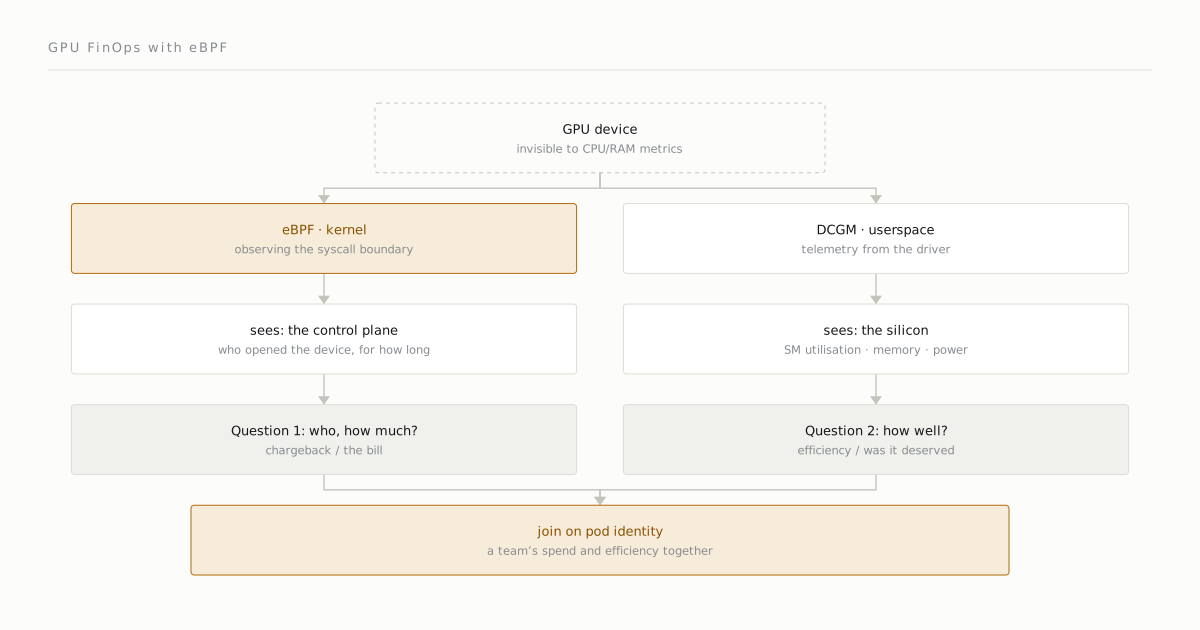
These map onto two different measurement planes, and the rule that organizes everything below is: eBPF answers attribution; the GPU’s own counters answer efficiency. Neither substitutes for the other.
What eBPF can see: the control plane
eBPF runs in the kernel and attaches to kprobes, uprobes, tracepoints, and syscalls. There is no GPU-utilization tracepoint to read — but there are two surfaces where GPU work is requested, and both are visible from the kernel:
- The driver ioctl boundary. Every piece of GPU work — kernel submission, memory allocation, synchronization — ultimately becomes an
ioctl()to/dev/nvidiactland/dev/nvidia0…N. A kprobe on the driver’s entry points (nvidia_unlocked_ioctl,nvidia_open) sees that traffic. (The closed driver historically exposes only one tracepoint,nvidia:nvidia_dev_xid, for hardware error events; everything else is kprobed.) - The CUDA library boundary. A uprobe on
libcuda.so/libcudart.sotraces the API itself:cuLaunchKernel,cuMemAlloc,cuMemcpyHtoD,cuStreamSynchronize, and friends. Pairing an entry uprobe with a return uretprobe measures each call’s duration.
The reason this is attribution is that at every hook point eBPF reads the calling PID/TGID and cgroup natively — bpf_get_current_pid_tgid and the cgroup id are right there. That gives you the chain PID → cgroup → pod → namespace → team with no application changes and no cooperation from NVIDIA. Per pod you get: kernel-launch counts, launch dimensions, VRAM allocation sizes, memcpy volume and direction, and call timing. That is a real, defensible chargeback signal derived entirely from the kernel side of the boundary.
The ecosystem here is young but real. The primitives work today — there are working write-ups and tutorials uprobing the CUDA libraries and kprobing the nvidia ioctl path, and bpftime explores tying eBPF logic to GPU events. Tetragon (Cilium) ships generic process_uprobe, process_kprobe, and ioctl tracing with Kubernetes pod identity, so it can be pointed at the CUDA symbols or the ioctl path — but understand that this is a TracingPolicy you author, not a shipped “GPU FinOps” feature. There is no dominant turnkey eBPF chargeback product yet. Anyone selling you “drop-in eBPF GPU FinOps” is selling further than the ecosystem currently reaches.
What eBPF cannot see: the silicon
This is the honest limit, and it is not a maturity problem that will be fixed in a release — it is physics of where the data lives.
eBPF sees the control plane: API calls, ioctls, allocation sizes, launch counts, and submit-to-complete timing where you can trace it. It does not see inside the GPU. It cannot read SM occupancy, tensor-core utilization, or achieved memory bandwidth, because those are hardware performance counters that live on the device and are exposed only through NVML / DCGM / CUPTI. eBPF has no path to them. It can tell you a pod launched ten thousand kernels and allocated 40 GB of VRAM; it cannot tell you whether those kernels saturated the SMs or left them 90% idle.
There is a second, subtler limit. Even at the ioctl boundary eBPF can hook, the payloads are largely opaque. The driver’s command structures (the NV_ESC_* Resource Manager API) are complex and effectively proprietary. You can see that an ioctl happened — its command number, the calling PID, the timing — but decoding the semantic content of an arbitrary RM payload is impractical and fragile. You get the fact of the work and its attribution, not a free reading of its meaning.
A note that closes a tempting door: NVIDIA’s open kernel modules (open-gpu-kernel-modules, Turing and newer) open the kernel interface layer — the module init, the ioctl entry points, the NV_ESC_* command surface. That genuinely helps you understand what to hook. But the GPU’s brain stays closed: on Turing+ much of the management runs on on-GPU GSP firmware, and that firmware — along with the user-mode driver components the modules require — is still shipped closed. Opening the kernel modules does not expose hardware performance counters to eBPF. The on-device limit is unchanged. If someone claims the open modules let eBPF read SM occupancy, they are wrong on current evidence.
The userspace path you still need: DCGM
Because eBPF cannot see the silicon, the efficiency half of the answer comes from userspace, and the standard tool is NVIDIA DCGM (Data Center GPU Manager) with dcgm-exporter for Prometheus. DCGM reads the GPU’s hardware counters through the driver and exposes the fields eBPF can’t reach:
DCGM_FI_PROF_SM_ACTIVE— fraction of time at least one warp was active on a multiprocessor, averaged across all of them.DCGM_FI_PROF_SM_OCCUPANCY— fraction of resident warps relative to the maximum supported: true occupancy.DCGM_FI_PROF_PIPE_TENSOR_ACTIVE— fraction of cycles the tensor pipe was active.DCGM_FI_PROF_DRAM_ACTIVE— a memory-bandwidth proxy.DCGM_FI_DEV_FB_USED— framebuffer (VRAM) actually in use.
These are the numbers that tell you whether a team’s expensive allocation was earning its keep. DCGM attributes them to pods through the kubelet Pod Resources API (a gRPC service at /var/lib/kubelet/pod-resources), which maps each GPU UUID to the pod that holds it.
But DCGM’s attribution has a hard edge that is exactly where eBPF earns its place: DCGM produces device-level metrics, so it cannot disambiguate consumers sharing one physical GPU. Under time-slicing or MPS (Multi-Process Service), all pods sharing a GPU receive identical, duplicated device-level values — including DCGM_FI_DEV_FB_USED. NVIDIA’s own exporter documents that it does not associate metrics to containers when time-slicing is enabled; with --kubernetes-virtual-gpus=true, every sharing pod mirrors the whole physical GPU’s state. Under MIG, attribution shifts to the GPU-instance level, not arbitrary pods. So precisely in the shared-GPU case — the case that exists because whole-GPU allocation wastes money — DCGM cannot tell you who consumed what. eBPF’s PID-level tracing can. The two tools are complementary at exactly the seam where each is weakest.
(For the deepest efficiency profiling there is CUPTI, the CUDA Profiling Tools Interface, which can read counters DCGM doesn’t surface — but metric-replay profiling like Nsight Compute re-runs kernels multiple times and carries heavy overhead. It is a profiling-session tool, not always-on per-tenant telemetry. DCGM is the lower-overhead, sampling-based continuous path; CUPTI is the heavy, deep one.)
The kernel-vs-userspace tradeoff, stated plainly
| Plane | Tool | Sees | Cannot see |
|---|---|---|---|
| Kernel (control) | eBPF | PID→pod attribution, launch counts, alloc sizes, memcpy volume, call timing — including per-pod under time-slicing | on-device SM/tensor occupancy, memory bandwidth, ioctl payload internals |
| Userspace (device) | DCGM | true SM occupancy, tensor activity, DRAM activity, VRAM used — from hardware counters | per-pod attribution under shared GPU (time-slicing/MPS): all sharers get identical values |
eBPF is low-overhead, needs no app changes, needs no vendor cooperation, and attributes natively by PID/cgroup — it is the right tool for who and how much. DCGM reads the silicon — it is the right tool for how well. The costs are honest too: uprobes carry real overhead and the CUDA symbols are versioned (cuMemAlloc@CUDA_11.0 vs @CUDA_12.0), so probes need dynamic symbol resolution and break across driver upgrades; CUDA API calls can fire ten-thousand-plus times a second, so handlers must stay cheap or they slow the very workload they measure. DCGM is userspace polling with its own sampling overhead and a hardware constraint that only certain counter groups can be read together.
Why you need both, in order
The wrong turn is picking one tool and asking it the other tool’s question — billing teams on DCGM’s device-level numbers and silently overcharging everyone who shares a GPU, or trusting eBPF’s launch counts as a proxy for efficiency and concluding a busy-looking workload was well-utilized. The order that actually works:
1. eBPF: attribute GPU work to pod/team        (who, how much — the bill)
2. DCGM: measure on-device efficiency          (how well — was it justified)
3. Join them on pod identity                    (the team's spend AND its efficiency)
Attribution first, because that is the question finance actually asked and the one your existing stack cannot answer at all. Efficiency second, because it turns the bill into a decision — a team holding an expensive allocation at 4% occupancy is paying a just-in-case capacity tax you can now see, where before the GPU was a flat line item nobody could open. Joined on pod identity, you finally have what you have for every other resource: spend, attributed, with the efficiency context to act on it. The reason it took two planes is the same reason it was invisible — the silicon never lived in the accounting plane, and no single probe spans the boundary.
See also: the DCGM exporter docs cover the pod-attribution path and the DCGM feature overview defines the profiling fields, and the eBPF primitives this leans on are documented at ebpf.io and in Tetragon.
Comments
Sign in with your GitHub account to join the discussion. Comments are stored in GitHub Discussions.