Most web backends are not compute-intensive but data-intensive. The bottleneck is rarely the CPU computing something; it is almost always moving data from one place to another, storing it, and keeping it consistent. Boring architecture — a single VPS, shared PostgreSQL, shared Redis — carries a surprising amount of that load.
But under data load this architecture does not slow down gradually. It breaks at discrete points, and in a predictable order. This piece maps those points: which signal announces each one, what the next step is, and what that step costs.
Let me state the one rule up front: do these steps in order. Each step buys you time and adds operational weight in return. Doing step 4 before step 1 is paying a complexity tax without solving anything.
On which axis data density breaks
“Scaling” is not a single number. Request count is one axis, data volume an entirely different one. A system can take 50 requests a minute and still drown in data; another can comfortably handle 5,000 requests a second while its data layer sits untouched.
The axes that actually break data-intensive systems are these:
- Working set / RAM ratio — whether the frequently accessed data fits in RAM.
- Read / write ratio — which side the load is dominated by.
- Single table size — a single relation growing large enough to wreck its index and vacuum behavior.
- Write throughput — the number of commits a single primary can absorb per second.
- Consistency requirement — how stale the data is allowed to be when read.
These axes do not all break at the same time. That is the good news: you don’t have to solve all of them at once. An architectural decision starts with an honest answer to “which axis breaks first” — by measurement, not assumption.
The starting point
Before talking about breaking points, let me describe the thing that breaks. The data layer of the setup in the Laravel production stack piece looks like this:
   PHP-FPM ──┬──► pgBouncer ──► PostgreSQL 16
             │                  (single primary)
             │
             └──► Redis 7
                  (cache · session · lock)
A single primary with connection pooling via pgBouncer in front. Redis carries cache, session, and locks. As long as a database stays within a few tens of GB and the working set fits in RAM, this setup runs without complaint up to thousands of requests a minute. The real question is when it stops working.
Breaking point 1 — The working set no longer fits in RAM
This is the first and most common breaking point of data density. PostgreSQL keeps frequently accessed pages in shared_buffers and the rest in the operating system’s page cache. As long as the hot data — the working set — fits in these two layers, reads run at RAM speed. The moment it doesn’t fit, every query drops to random disk I/O and p95 latency climbs abruptly, with no intermediate gradient.
Signal! A dropping cache hit ratio. Don’t guess it, measure it:
SELECT
  sum(blks_hit) * 100
    / nullif(sum(blks_hit) + sum(blks_read), 0) AS cache_hit_ratio
FROM pg_stat_database;
On a healthy OLTP system this ratio is above 99%. If it starts dropping toward 95%, the working set no longer fits in shared_buffers — but that is only the first layer: blks_hit counts hits in PostgreSQL’s own buffer cache, and a page returned from the operating system’s page cache is counted here as blks_read. So read this ratio together with disk read IOPS: when the ratio drops and IOPS climbs steadily at the same time, the working set is genuinely overflowing RAM. heap_blks_read approaching heap_blks_hit on specific tables in pg_statio_user_tables shows which tables are doing it.
What to do? In order:
- Index discipline first. Most “RAM isn’t enough” cases are actually “unnecessary data is being read” cases. A query doing a sequential scan because of a missing index makes the working set look many times larger than it is. Find the large tables with a high
seq_scancount inpg_stat_user_tables. - Then separate the dead data. If hot and cold data live in the same table, the working set is artificially inflated. Three-year-old closed records don’t have to sit in the same heap as this week’s active ones.
- Vertical scale last. Adding RAM is a one-time job, it is cheap, and it adds no complexity. Have a few times the working set in RAM. This is the plainest scaling move available — nothing to be ashamed of, it is the first choice.
Cost. The cost index maintenance adds to every write, and the monthly difference of a bigger VPS. Both are small. That is why breaking point 1 is the cheapest to solve — and that is why it comes first.
Breaking point 2 — Read load saturates the single primary
The working set fits in RAM, but the primary is still filling up. CPU stays high, queries wait in the queue, and the load is overwhelmingly on the read side. Report pages, listing endpoints, search — all reading from the same primary.
Signal! CPU stays high on the primary while the write rate stays low. SELECTs dominate the total time in pg_stat_statements. The cl_waiting counter in pgBouncer has lifted off zero — meaning clients are queuing for a connection.
What to do? A read replica. Using PostgreSQL’s streaming replication, stand up a hot standby copy next to the primary and route read traffic there. Laravel supports this natively with a connection split:
// config/database.php
'pgsql' => [
    'driver'  => 'pgsql',
    'read'  => ['host' => ['10.0.0.2']],   // replica
    'write' => ['host' => ['10.0.0.1']],   // primary
    'sticky' => true,
    // ...shared settings
],
sticky => true is critical. If you wrote within a request, subsequent reads in the same request go to the primary — the user does not see stale data they just wrote themselves. The replica gets its own pgBouncer pool, separate from the primary’s.
Cost. Replication lag. The replica trails the primary by a few milliseconds — under load, a few seconds. So you lose read-after-write consistency, outside the boundary sticky rescues. Watching lag is now an operational line item:
SELECT client_addr, state,
       pg_wal_lsn_diff(pg_current_wal_lsn(), replay_lsn) AS lag_bytes
FROM pg_stat_replication;
The second cost: every query has to answer the question “can this read stale data?” For most listing/report queries the answer is “yes.” For balances, stock, authorization checks the answer is “no” — those stay on the primary. This classification is now part of the architecture and needs to be documented.
Note: A read replica adds nothing to write capacity. The same writes are replayed on the replica too. A replica solves the read-load problem — not the write-load problem. Confusing the two is the most expensive wrong breaking point.
Breaking point 3 — A single table is too big
The database as a whole is reasonable, but a single table has reached tens to hundreds of millions of rows. Usually the append-heavy ones: events, audit_log, notifications, time-series measurements. This table is now a problem in its own right.
Signal! Autovacuum can’t keep up on that table — n_dead_tup stays high in pg_stat_user_tables and last_autovacuum is stale. Indexes are bloating, and even a single-row update is slowing down. DELETE-ing old data takes hours and leaves a massive vacuum debt behind it.
What to do? Split that table into partitions. For append-heavy data the natural key is time:
CREATE TABLE events (
    id          bigserial,
    occurred_at timestamptz NOT NULL,
    payload     jsonb       NOT NULL
) PARTITION BY RANGE (occurred_at);

CREATE TABLE events_2026_05 PARTITION OF events
    FOR VALUES FROM ('2026-05-01') TO ('2026-06-01');
What this buys you:
- Partition pruning — queries filtered on
occurred_atonly touch the relevant partitions. - Cheap deletion — discarding old data is not
DELETEbutDROP TABLE events_2026_01. Seconds, no vacuum debt. - Bounded vacuum — autovacuum deals with each partition separately, in small pieces.
Automate monthly partition creation with pg_partman; a manually managed partition calendar is doomed to be forgotten.
Cost. One real trap: in a partitioned table the primary key must include the partition key. So id alone cannot be the PK; it becomes (id, occurred_at). This makes giving a foreign key from other tables to this table harder — which is generally not wanted on append-only log tables anyway, but it is a knowingly accepted tradeoff. On purely append-only tables that are “only ever queried by time range,” a BRIN index instead of B-tree is much smaller and sufficient.
Breaking point 4 — Write load saturates the single primary
This is the hard one. The replica rescued reads, partitioning tamed the single table — but the primary is saturating on the write side. The commits per second, disk fsync, and WAL throughput have hit the ceiling. Adding a replica does not help here: the same writes are replayed on every replica.
Signal! I/O wait is high on the primary, checkpoints have become frequent in pg_stat_bgwriter, and the WAL production rate is straining the disk’s fsync capacity. Write latency climbs independently of read load.
What to do? There is no single magic move here; in order, these three:
- Reduce write amplification. Every index has a cost on every
INSERT/UPDATE. Drop the indexes withidx_scan = 0inpg_stat_user_indexes— the unused ones. On frequently updated tables, lowerfillfactorto raise the HOT update rate. Batch inserts instead of one-at-a-timeINSERTs. - Move append-heavy data off the primary. The bulk of the write load usually comes from a single source: the event log, metrics, analytics events. This data often doesn’t want relational integrity either. Moving it to a separate store gives the primary back to its real job — transactional data.
- Last: split the data domain. If it still isn’t enough, you need a real data-domain split (functional sharding) — which takes us to the next breaking point.
Cost. This is the point where boring architecture is genuinely strained. Points 1–3 kept the primary singular; from here on it means giving up that singularity. Don’t rush: most systems never reach point 4, and most of those that do arrive early precisely because they skipped point 1 (missing index, bloated working set).
Breaking point 5 — The data layer must split from the application
A single application has become dominant on the shared database. It produces the write load, the biggest tables belong to it, and it is the source of incidents. The “growth signals” in the single VPS multi-project architecture piece announce exactly this.
Signal! On the shared PostgreSQL it is clear the load comes from a single database. That application’s maintenance windows affect the other projects too. Capacity planning is now done on the axis of “that application,” not “the VPS.”
What to do? Move that application to its own data layer — a separate PostgreSQL instance, either on its own server or on a managed service. Pulling an application out of the shared database is done with a restore from a backup taken with pgBackRest + closing the gap with logical replication + a short cutover window.
This does not mean “break everything into microservices.” It means taking a single data-dominant application into its own layer — while the others stay happily on the shared setup. The separation decision is made by the data profile, not the org chart.
Cost. A second database: a second backup pipeline, a second monitoring target, a second upgrade calendar. You can no longer JOIN between the two databases — queries that cross that boundary are joined in the application layer. These are real costs; they are paid in return for one application dominating the shared setup, not up front.
Wrong breaking points
Things that look like a data-load problem but aren’t lead to the most expensive wrong turns. The common ones:
| Appears | Reality | Right move |
|---|---|---|
| ”The database is slow” | N+1 query — the app fires 200 queries | Eager loading; measure query count |
| ”We need a replica” | A missing index on a single query | EXPLAIN ANALYZE, add the index |
| ”We need sharding” | Replica and partitioning never tried | Exhaust points 2 and 3 first |
| ”PostgreSQL won’t do, let’s go NoSQL” | jsonb, partitioning, BRIN never used | Use PostgreSQL to the end |
| ”We have write load, let’s add cache” | Cache reduces reads, not writes | For writes, look at point 4 |
The common error pattern is this: confusing the problem a tool solves with the problem at hand. A read replica scales reads. A cache reduces reads. Partitioning tames a single table. None of these increases write throughput. Choosing a tool without measuring which axis is breaking is investing in the wrong breaking point.
There is also the lure of the “new database.” Cassandra, MongoDB, a separate Kafka — before bringing these in, make sure you have exhausted PostgreSQL’s jsonb, its LISTEN/NOTIFY, its declarative partitioning, its BRIN indexes, and its logical replication. Most teams use 20% of PostgreSQL and conclude “PostgreSQL isn’t enough.”
Why the order matters
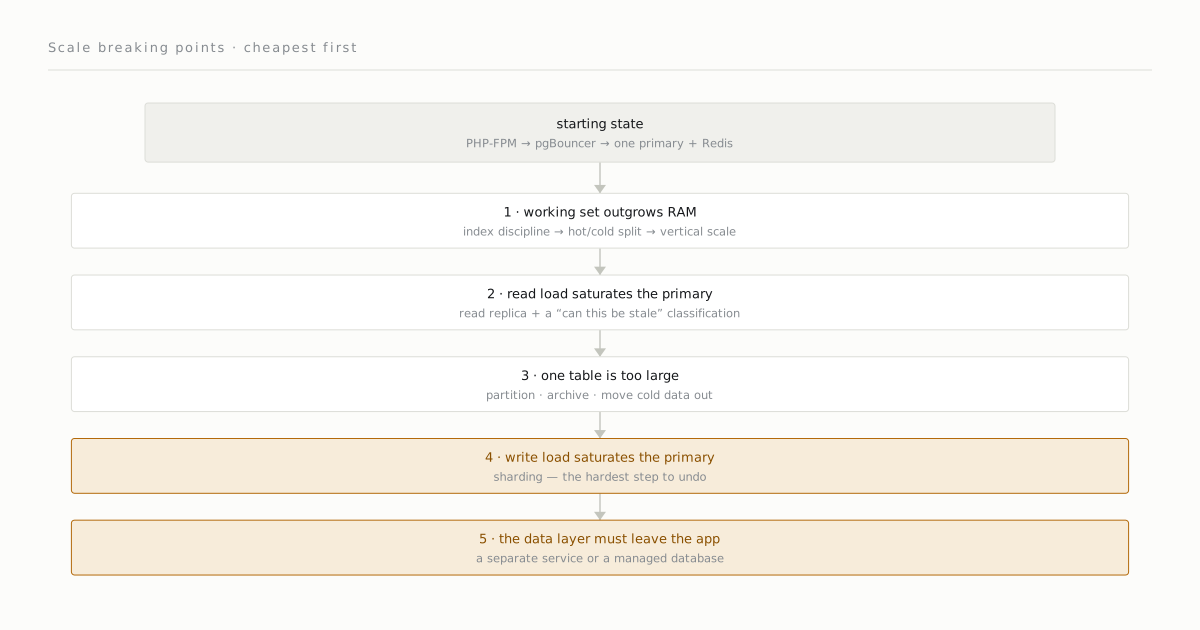
These five points are not a checklist but an order. Each step is deferred by the time the previous one bought:
1. Working set / RAM      → index + RAM      (cheapest)
2. Read load              → read replica
3. Single table size      → partitioning
4. Write load             → amplification + decoupling
5. Data-dominant app      → separate data layer   (most expensive)
Skipping the order is expensive in both directions. If you skip 1 and jump to 2 — ignoring the missing index and adding a replica — you’ve bought the stale-read risk, replication-lag monitoring, and an extra server for a problem a single CREATE INDEX would have solved. The reverse holds too: trying to “solve” a system that has genuinely hit the write wall at point 4 by adding cache only delays the diagnosis.
The strength of plain architecture is precisely that these breaking points are visible and ordered. A metric announces each step, the cost of each step is known in advance, and no step forces the next. Instead of the “the whole data layer collapsed” scenario, you live the “cache hit ratio dropped to 96%, time to add RAM” scenario.
Where this approach truly ends is clear too: sustained write throughput that exceeds the fsync capacity of a single large machine, or a geographically distributed low-latency requirement. A system that reaches there already has a business model to finance it — and at that point complexity is no longer a debt but a price already paid. Not before.
Comments
Sign in with your GitHub account to join the discussion. Comments are stored in GitHub Discussions.