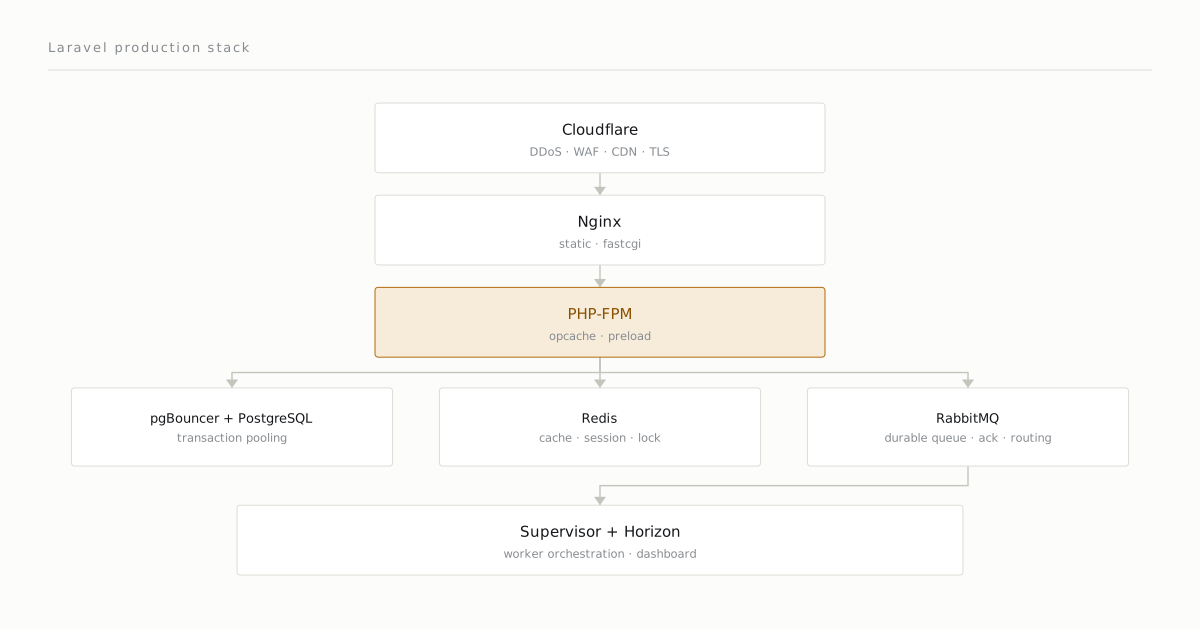
Building Laravel takes an hour; putting it into production seriously takes a week. This piece walks through the stack I use and why each piece is there. I’m not saying “everything is mandatory” — I’m someone who keeps things minimal until I understand they’re needed — but what each piece buys you is concrete.
Why do I put servers behind Cloudflare?
- DDoS protection, WAF, rate limiting, and similar features out-of-the-box.
- It forwards the real client IP in the
X-Forwarded-ForandCF-Connecting-IPheaders; with thereal_ipdirectives below, that IP is what the application sees. - You can do SSL termination at Cloudflare and talk to the backend over
http. - With its CDN features, serving static assets from the Cloudflare cache is easy.
- It provides a free 15-year SSL certificate, which simplifies management.
Nginx — why not Apache?
Both work. I prefer Nginx because:
- Its asynchronous event-loop model is more consistent at low latency.
- TLS termination, static asset serving, and fastcgi are all clean in a single config.
- The
try_files $uri $uri/ /index.php?$query_stringdirective is canonical for Laravel.
A typical server block:
# -----------------------------
# HTTP → HTTPS redirect
# -----------------------------
server {
    listen 80;
    server_name app.example.com;
    return 301 https://$host$request_uri;
}

# -----------------------------
# HTTPS
# -----------------------------
server {
    listen 443 ssl http2;
    server_name app.example.com;
    root /var/www/app/current/public;
    index index.php;

    add_header X-Frame-Options "SAMEORIGIN";
    add_header X-Content-Type-Options "nosniff";
    add_header Strict-Transport-Security "max-age=31536000; includeSubDomains" always;

    client_max_body_size 25M;

    access_log /var/log/nginx/app.example.com.access.log;
    error_log  /var/log/nginx/app.example.com.error.log warn;

    # Real client IP behind Cloudflare, one line per range: https://www.cloudflare.com/ips/
    set_real_ip_from 173.245.48.0/20;
    set_real_ip_from 103.21.244.0/22;
    # ... remaining Cloudflare ranges
    real_ip_header CF-Connecting-IP;

    location / {
        try_files $uri $uri/ /index.php?$query_string;
    }

    location ~ \.php$ {
        fastcgi_pass unix:/run/php/php8.4-fpm-app-example.sock;
        fastcgi_index index.php;
        fastcgi_param SCRIPT_FILENAME $realpath_root$fastcgi_script_name;
        include fastcgi_params;
        fastcgi_buffering on;
        fastcgi_read_timeout 60s;
    }

    location ~* \.(css|js|png|jpg|jpeg|gif|svg|woff|woff2)$ {
        expires 1y;
        add_header Cache-Control "public, max-age=31536000, immutable";
        # add_header is not inherited once this level declares one of its own
        add_header X-Frame-Options "SAMEORIGIN";
        add_header X-Content-Type-Options "nosniff";
        add_header Strict-Transport-Security "max-age=31536000; includeSubDomains" always;
        access_log off;
    }

    location ~ /\.(?!well-known).* {
        deny all;
    }
}
The set_real_ip_from list has to cover every Cloudflare range; otherwise Nginx keeps logging Cloudflare’s IP instead of the client’s. Note the single dot-file block: Nginx stops at the first matching regex location, so an exception-free location ~ /\. placed after it would swallow /.well-known/ too and break ACME validation.
PHP-FPM — pool configuration
I covered the details in a separate piece. The opcache settings specific to production:
opcache.enable=1
opcache.memory_consumption=192
opcache.interned_strings_buffer=16
opcache.max_accelerated_files=20000
opcache.validate_timestamps=0   ; needs a reset on deploy
opcache.preload=/var/www/app/current/preload.php
opcache.preload_user=app        ; php-fpm master starts as root; preload is refused without this
With validate_timestamps=0, PHP doesn’t automatically detect file changes — after a deploy, an FPM reload via kill -USR2 is mandatory. In return, a difference of hundreds of requests per second.
PostgreSQL — why not MySQL?
Both work. My reasons for preferring PostgreSQL:
- JSON/JSONB support is more mature than MySQL’s (GIN index, query operators).
- CTEs, window functions, materialized views are native.
- Logical replication and PITR tooling is cleaner.
- Transactional DDL — if a crash happens mid-migration, the database stays clean.
In return — setup demands a bit more discipline. Typical postgresql.conf sensitivities:
shared_buffers = 4GB                # ~25% of total RAM
effective_cache_size = 12GB          # ~75% of RAM
work_mem = 16MB
maintenance_work_mem = 256MB
wal_buffers = 16MB
max_connections = 500
checkpoint_timeout = 15min
checkpoint_completion_target = 0.9
random_page_cost = 1.1              # for SSD
effective_io_concurrency = 200
Backups go through pgBackRest rather than pg_dump: full plus incremental, with PITR on top of the WAL archive.
pgBouncer — connection pool
PHP opens and closes a connection per request. Starting a PostgreSQL connection is expensive (a forked process). We absorb this by putting pgBouncer in front in transaction mode. auth_query note.
Redis — three hats
The same Redis instance plays three roles:
- Cache —
Cache::remember(...). - Session —
SESSION_DRIVER=redis. - Lock — a distributed mutex via
Cache::lock(...).
They all run safely on a single Redis — as long as:
- Maxmemory policy:
volatile-lru(evict only keys that carry a TTL, via LRU). appendonly no(RDB is enough for cache, session, and lock data).save 900 1 300 10 60 10000(RDB snapshot rules).
RabbitMQ (optional)
As Laravel’s queue driver I use rabbitmq — instead of Database or Redis. Why?
Queue — QUEUE_CONNECTION=rabbitmq.
The Redis queue driver is simple but falls short of RabbitMQ’s features:
- Persistence — RabbitMQ writes durable messages to disk; Redis serves the queue from memory and only reaches disk through RDB snapshots or AOF.
- Acknowledgements — RabbitMQ deletes a message once the consumer acks it; Laravel’s Redis driver deletes the finished job from the reserved set on its own, so the difference isn’t cleanup but redelivery: Redis leans on a
retry_aftertimeout, RabbitMQ on the consumer’s connection. - Routing — with RabbitMQ exchanges the broker decides which queue a message lands in; on Redis you can name as many queues as you like with
onQueue(), but the routing decision stays in the application. - Monitoring — the RabbitMQ management panel shows queues, messages, and consumers at the broker level; on Redis the same view comes from Horizon, and it stops at what the application dispatched.
Supervisor + Horizon
Queue workers run under Supervisor. Horizon is Laravel’s queue dashboard — so that it can orchestrate the workers, Supervisor runs the horizon process:
[program:horizon]
process_name=%(program_name)s
command=php /var/www/app/current/artisan horizon
user=app
autostart=true
autorestart=true
redirect_stderr=true
stdout_logfile=/var/log/horizon.log
stopwaitsecs=3600
Out of the box Horizon only drives a redis queue connection; on the rabbitmq connection above it needs the Horizon mode of the vladimir-yuldashev/laravel-queue-rabbitmq package — RABBITMQ_WORKER=horizon, which makes the connection dispatch the events Horizon reads. Horizon forks its worker processes internally — you set the worker count and memory limit for each queue via config/horizon.php.
Scheduler
A single cron is enough:
* * * * * app cd /var/www/app/current && php artisan schedule:run >> /dev/null 2>&1Laravel manages its own scheduler internally. Mind the withoutOverlapping() and onOneServer() modifiers — they prevent race conditions on multiple servers.
Logging
Structured logs in JSON format:
// config/logging.php
'channels' => [
    'production' => [
        'driver' => 'stack',
        'channels' => ['daily', 'stderr'],
    ],
    'daily' => [
        'driver' => 'daily',
        'path' => storage_path('logs/laravel.log'),
        'level' => env('LOG_LEVEL', 'info'),
        'days' => 14,
        'formatter' => Monolog\Formatter\JsonFormatter::class,
    ],
],/etc/logrotate.d/laravel-app:
/var/www/app/shared/storage/logs/*.log {
    daily
    rotate 14
    compress
    delaycompress
    missingok
    notifempty
    create 0640 app app
    sharedscripts
}
.env management
.env always lives in the shared/ directory, symlinked into deploys. Never in the repo. For secrets I do this with the power of simplicity — if a vault becomes necessary we add it; you don’t need one to start.
Deploy
A symlink-swap model. Details are in the “Deploy” section of the multi-project architecture piece.
What do you lose by removing each piece?
| Component | What happens if you remove it |
|---|---|
| pgBouncer | During connection storms PostgreSQL connections run out and requests throw 500s |
| Supervisor | Workers don’t come back after a crash; you’re forced to set up alerts |
| Horizon | Visibility collapses and you answer “why is the queue slow” blind |
| opcache | Every request reads and parses the PHP file from disk, ~5x slowdown |
| pgBackRest | You’re left with pg_dump — you lose PITR, and in a real incident your margin for error is a single daily backup |
| Redis lock | You’re open to race conditions, with no distributed-safe mutex left |
This is exactly where the strength of a boring stack lies: each piece is quantitatively valuable and easy to swap. Instead of a “the whole cluster went down” scenario, you live through an “I missed the Redis maxmemory setting” scenario — and fixing that takes five minutes.
Comments
Sign in with your GitHub account to join the discussion. Comments are stored in GitHub Discussions.