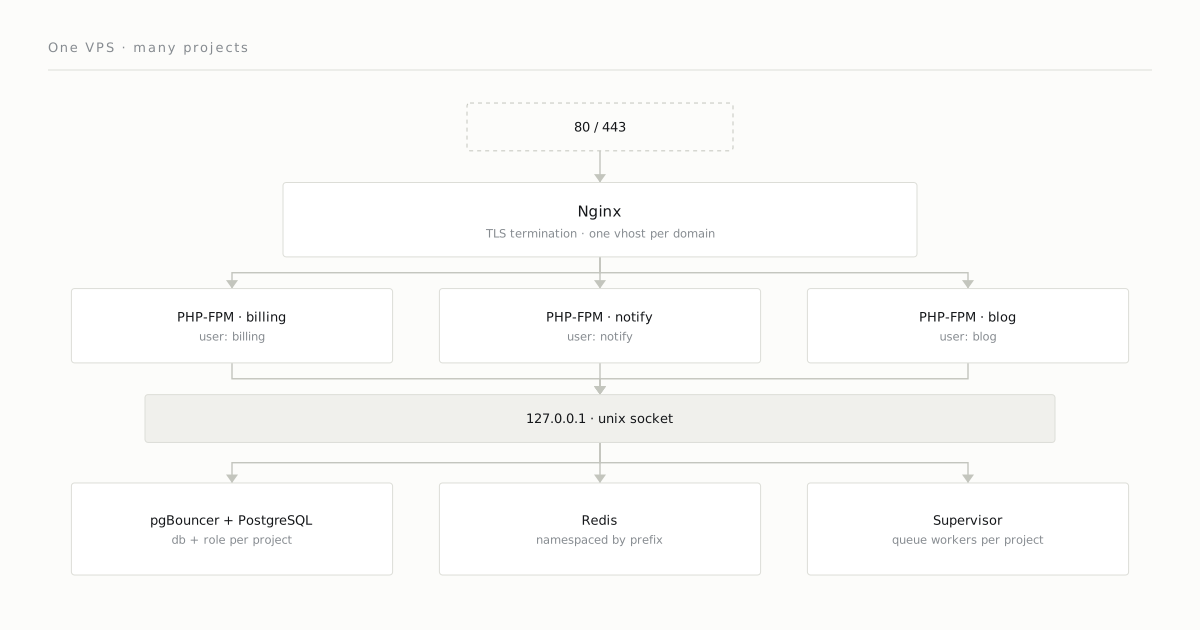
For small and mid-sized SaaS projects, a single VPS is more than enough to host several applications. Kubernetes, service meshes, the “cloud native” pressure — all of it pulls many teams off course. But if the total load fits on one machine, the cost of distributing it almost never pays off.
This post walks through the pattern I use, step by step.
The goal
- 3–5 independent Laravel applications.
- Each app gets its own domain, its own processes, its own user.
- PostgreSQL and Redis are shared: isolated by role in PostgreSQL, separated by key prefix in Redis.
- Deploy with a single command, zero-downtime.
- Backup and monitoring from one place.
- All of it on a VPS under $40/mo.
Users and file layout
Each application gets its own unix user:
billing:billing  /var/www/billing
notify:notify    /var/www/notify
blog:blog        /var/www/blog
www-data (Nginx) is added to the group for read access to the code directory. Write access stays with the application’s own user only. This isolation isn’t there so that a misbehaving app can’t harm the others; it’s there to keep one developer’s mistake from affecting another project — which is the far more common scenario.
PHP-FPM pools
Covered in detail in Nginx + PHP-FPM Pool Separation. The short version: each app is defined in its own pool.d/*.conf file with pm.max_children, memory_limit, and a unix user.
Database: shared PostgreSQL
A single PostgreSQL cluster, with a separate database and role for each application:
CREATE ROLE billing_app LOGIN PASSWORD '...';
CREATE DATABASE billing OWNER billing_app;
REVOKE ALL ON DATABASE billing FROM PUBLIC;pg_hba.conf:
host  billing  billing_app  127.0.0.1/32  scram-sha-256
host  notify   notify_app   127.0.0.1/32  scram-sha-256
host  blog     blog_app     127.0.0.1/32  scram-sha-256
No application can even see another’s DB.
Connection pooling with pgBouncer
PHP-FPM opens and closes its connection per request by default — and even with persistent connections (PDO::ATTR_PERSISTENT) the link stays bound to a single worker, so there’s no shared pool. PostgreSQL connection setup (~10ms) adds up in the aggregate. We solve this by putting pgBouncer in front with pool_mode = transaction. The auth_query post covers the details.
Redis: shared, isolated by namespace
A single Redis instance. Each Laravel app uses a different prefix:
'redis' => [
    'cache' => [
        'host' => '127.0.0.1',
        'database' => 0,
        'prefix' => 'prod:billing:cache:',
    ],
    'queue' => [
        'host' => '127.0.0.1',
        'database' => 0,
        'prefix' => 'prod:billing:queue:',
    ],
],
The prefix is a naming convention, not a boundary: all three apps connect to the same instance on database 0, with no requirepass and no ACL, so any one of them can read another’s keys. Where that has to be enforced, give each app its own Redis ACL user.
Details in the namespace isolation post.
Queue workers
Supervisor manages each application’s queue worker as a separate process group:
/etc/supervisor/conf.d/
├── billing-worker.conf
├── notify-worker.conf
└── blog-worker.conf
In each file the app runs under its own user:
[program:billing-worker]
process_name=%(program_name)s_%(process_num)02d
command=php /var/www/billing/current/artisan queue:work rabbitmq --queue=default --sleep=1 --max-time=3600
user=billing
numprocs=4
autostart=true
autorestart=true
stopwaitsecs=3600
Deploy: symlink swap
In each application directory:
/var/www/billing/
├── releases/
│   ├── 2026-05-12-1430/
│   ├── 2026-05-13-0900/
│   └── 2026-05-13-1100/    ← new release
├── shared/
│   ├── .env
│   ├── storage/
│   └── uploads/
└── current → releases/2026-05-13-1100
Deploy steps:
- Create the new release folder, git checkout, composer install, build.
- Symlink the
shared/contents in. - Migrate (must be forward-compatible).
- Flip the
currentsymlink atomically to the new folder (ln -sfn). - Gracefully reload PHP-FPM with
kill -USR2(opcache invalidation). - Restart Supervisor for the queue workers only.
One caveat on step 5: USR2 goes to the FPM master and gracefully reloads all pools — there is no signal that restarts a single pool. So deploying one project recycles every project’s workers and clears the shared opcache; the isolation above holds at runtime, not on the deploy path.
Keeping old releases around (say, the last 5) reduces rollback to a single command: point the symlink at the old folder, reload PHP-FPM.
Backup
- PostgreSQL: pgBackRest, with the repository writing to an S3-compatible bucket.
- Redis: AOF off, RDB every hour. Enough for cache-only use.
- Uploads (
shared/uploads): hourly S3 sync with rclone. /etc: daily tar + S3 (version control for the config).
Monitoring
A self-hosted Prometheus + Grafana is overkill at this scale. What I prefer:
- uptime-kuma — HTTP-checks every domain, alerts to Slack/Telegram.
- node_exporter + Cloudflare metrics — server health.
- PHP-FPM
/statusendpoint — watch the slow request count. - logrotate —
/var/log/{nginx,php-fpm,laravel}/*.logdaily.
Limits and growth signals
This architecture breaks down when one of the following signals shows up:
- CPU consistently > 70%. Scale vertically (a bigger VPS) once, then split the applications apart.
- A single application becomes dominant on the DB. Move that app to its own PostgreSQL — a replica or a managed service.
- Geographic latency complaints. Here, moving static assets to a CDN is enough; moving the app server is extreme.
Why not Kubernetes?
Three reasons:
- Operational overhead. Running a k8s cluster on your own takes more time than writing the applications on top of it.
- Cost. Where the control plane is billed separately — EKS charges $0.10 per cluster-hour, ~$73/mo before a single node — a managed k8s with 3 small nodes runs 3–5x the cost of an equivalent VPS. Where it’s free, the gap closes: DigitalOcean’s 3 × $12/mo of nodes lands near VPS money.
- No payoff for the complexity. These applications don’t have to scale independently.
This architecture isn’t “lazy-eval k8s” — it’s a different paradigm. A plain, understandable, operationally small architecture. It gets split apart when it needs to be, and not before.
Comments
Sign in with your GitHub account to join the discussion. Comments are stored in GitHub Discussions.